Picasso 3D FlipBook Video Maker Software helps photographers and photo studio owners turn their finished photographs into engaging 3D flipbook videos. Instead of sharing only a collection of static images, photographers can present wedding albums and photo portfolios with realistic page-turning effects, customizable backgrounds, and background music. This creates another way to showcase completed projects and deliver digital albums to clients.
The software is designed for wedding photographers, album designers, and studio professionals who want a straightforward way to create digital flipbook presentations. Its features include one-click flipbook creation, customization options, and support for common image formats such as JPEG, PNG, and PSD. For professionals exploring additional premium album design software and plugins, Picasso 3D FlipBook Video Maker offers a practical way to present finished album designs in video format.
What Is Picasso 3D FlipBook Video Maker Software?
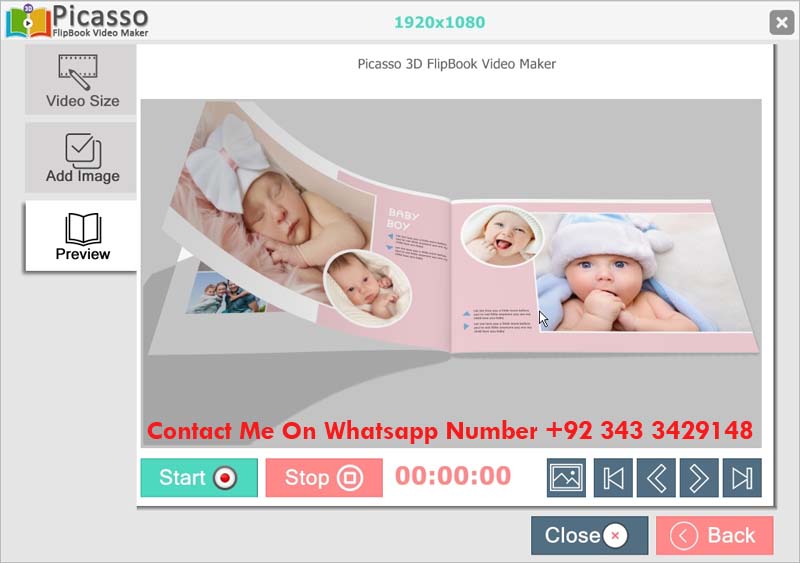
Picasso 3D FlipBook Video Maker is a photography presentation tool that converts a collection of photographs or album page images into a video featuring a three-dimensional page-flipping effect. The finished presentation resembles the experience of turning pages in a physical photo album, making it suitable for displaying wedding photographs, couple portraits, family albums, and other photo collections.
For wedding photographers, a completed album represents hours of photography, photo editing, and layout design. A 3D flipbook video provides an additional way to showcase that work. It can be shared with clients as a digital presentation, used to demonstrate album designs, or included as an optional extra in photography packages.
The software also provides customization options for adjusting the appearance of the presentation. Background settings, themes, music, and video resolution can be selected according to the project and intended display. These options help photographers prepare presentations that suit different clients and photography styles.
Watch the Picasso 3D FlipBook Video Maker Demo
The demo below demonstrates the software in action and provides a closer look at its flipbook presentation style. Watching the video helps photographers understand the page-turning effect and see how a collection of images can be presented as a digital album.
Key Features of Picasso 3D FlipBook Maker
1. One-Click 3D Flipbook Creation
The one-click creation feature simplifies the process of turning a prepared collection of images into a flipbook video. Instead of manually creating page-turning animations, users can use the software’s automated workflow to produce a digital album presentation. This can be especially useful for photographers who regularly prepare wedding albums for different clients.
2. Customizable Themes and Backgrounds
Different photography projects benefit from different presentation styles. The software provides customization options for themes and backgrounds, allowing the appearance of a flipbook to be adjusted to suit the photographs. A wedding album, family collection, and professional portfolio can each have a different visual style.
3. Background Music
Background music can help establish the mood of a digital album. A suitable soundtrack can complement wedding photographs, couple portraits, and other memorable occasions. Music selection should match the overall presentation and any intended use of the finished video.
4. Video Resolution Options
The software includes options for adjusting video resolution. This gives users more control over the output according to the intended display, whether the flipbook will be viewed on a mobile device, computer, or larger screen. The final result also depends on the quality of the source images and the selected export settings.
5. Support for JPEG, PNG, and PSD Files
Picasso 3D FlipBook Video Maker supports popular image formats, including JPEG, PNG, and PSD. This is useful for photographers and album designers who already have finished photographs or album pages prepared for presentation. Before starting a project, the input files should be organized in the required page order for a smoother workflow.
6. A Straightforward Interface
The software is intended to make flipbook creation accessible to both beginners and experienced photography professionals. Its automated workflow reduces the need to build page-turning effects manually, allowing more attention to be given to image selection, page order, and the final presentation.
How 3D FlipBook Video Maker Can Help a Photography Business
A digital flipbook video can complement the traditional services offered by a photography studio. Alongside printed albums and digital photo collections, a studio can provide clients with an additional way to revisit their photographs.
For example, a wedding photographer can use a finished album design to create a flipbook-style video that showcases the photographs in sequence. The presentation can be shared digitally or demonstrated to prospective clients as an example of the studio’s work. This can help communicate the value of professional album design more effectively than showing individual images alone.
Studios can also consider offering flipbook videos as an optional service within selected photography packages. Pricing should reflect the time involved, the project requirements, and the value provided to the client rather than assuming every client needs the same package.
Who Can Use Picasso 3D FlipBook Video Maker?
- Wedding photographers: Present wedding photographs and completed album pages as a digital flipbook video.
- Photo studio owners: Add another presentation option to existing photography services.
- Wedding album designers: Showcase finished page layouts using a realistic page-turning effect.
- Freelance designers: Prepare digital presentations for photography clients and portfolios.
- Photography beginners: Explore a simpler workflow for creating flipbook-style videos from prepared images.
Why Choose Picasso 3D FlipBook Video Maker?
For photographers who regularly deliver digital albums, the main advantage of Picasso 3D FlipBook Video Maker is the ability to create another presentation format without manually building every page-turning animation. Automated creation, background customization, music options, and support for common image formats make it a useful addition to a photography workflow.
The software is offered with unlimited validity as described in its purchase information, rather than requiring a recurring monthly subscription. Single-user and multi-user licensing options are also mentioned in the product offering. Before purchasing a license, studios should confirm which option suits the number of computers on which the software will be used.
The listed purchase option is provided below for photographers and studio owners who want to add flipbook video creation to their services.
Minimum System Requirements
Before installing Picasso 3D FlipBook Video Maker, check that the computer meets the stated minimum system requirements:
- Operating System: Microsoft Windows 7 or higher
- Processor: Intel Core i3 or better
- Memory: At least 4GB RAM
Actual processing speed can vary depending on the computer, the number of images, and the selected output settings. Keeping the source images organized and closing unnecessary applications during rendering may help maintain a smoother workflow.
Conclusion
Picasso 3D FlipBook Video Maker Software provides photographers, studio owners, and album designers with a practical way to turn prepared images into digital presentations featuring realistic page-turning effects. Its one-click creation workflow, customizable backgrounds, music options, resolution settings, and support for JPEG, PNG, and PSD files make it suitable for a range of photography projects. For wedding studios looking to present completed albums in another format, a 3D flipbook video can complement printed albums and ordinary photo galleries while giving clients another way to enjoy their photographs.